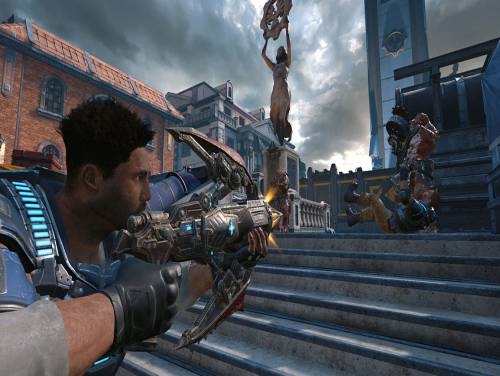
Welcome to our website. you are into the Gears of War 4 trainer page. Without too many premises let's describe this article!
If you know anything else relevant to the topic do not hesitate to contact us, you will make it more complete and more useful to all visitors.
Wwe also have cheats for Gears of War 4! You can find them in the appropriate Gears of War 4 cheats page. Inside there are paragraphs about cheats and unlockables relative to the game. If you are stuck somewhere in the game, or if you just want have more fun out of the rules, no way is better than consulting the cheats we have collected for you.
 Gears of War 4: Cheats and cheat codes
 The story of Gears of War 4 takes place 25 years after the events of Gears of War 3 Adam Fenix, father of Marcus Fenix, operated the weapon countermeasure to destroy the Imulsion killing the Lambent and the Locust. This led to the elimination of all types of fossil fuels, forced humanity to adapt new modes of survival and brought the advent of powerful storms of wind and fire that devastated the planet in the Evening. For this reason, the Coalition of Governments, to avoid extinction, he built walled towns to protect the citizens from external dangers. The COG declared the martial law, thus preventing any trip outside of the walls of the city. Outside of these settlements were born of the fields of Outsiders, outcasts trying to survive in hostile territories and live outside of the jurisdiction COG, conducting raids in their territories, to collect resources. The game focuses on James Dominic Fenix, the son of Marcus Fenix and Anya Stroud, who alongside his friends Delmont Walker and Kite Diaz, must face a new threat to the survival of humanity.
Let's move on to show you the trainer after the introduction we just wrote in. Before downloading it, consult the user guide to make sure you aren't going to make mistakes.
Download Trainer
Actually it is very rare to find games containing cheats because game developers are not interested at keeping them in their games. So the creation of cheats is executed by external programmers that spend their time and skills into the creation of trainers, programs that let you cheat on a particular game. They do it for passion or for money. Whatever the motivation, it's right to reward them for the time spent on their work.
Paid Cheats and Trainers are better in quality, contains more functionalities. They are maintained and supported by their developers.
Respect of the Copyright
The software you are about to download was not created by Apocanow. However, we have permission to publish and publicize by its authors Gears of War 4: Trainer - WINDOWS STORE - 12.7.1.2. The file you are about to download is virus free, even if sometimes your antivirus can trigger for a false positive.
Using this Trainer
Listen for "Activated".
Press desired option key
Options in Promo
Options
Numpad 2: Unlimited Ammo
Numpad 3: No Reload
Numpad 4: Can't Bleed Out
Numpad 5: No Turret Overheat
Numpad 6: Easy Kills
Numpad 7: Fabricator Power
Numpad 8: No Mulcher Overheat
Numpad 9: Lightning Protection
Notes
Scripted deaths are still possible.
Numpad 2: Unlimited Ammo - toggle on and most weapons and some items
are unlimited ammo.
Numpad 3: No Reload - toggle on and most weapons can fire without
needing to reload.
Numpad 4: Can't Bleed Out - toggle on and neither you nor your teammates
can bleed out while down. You can revive them or be revived with
infinite time.
Numpad 5: No Turret Overheat - toggle on and turrets you can man will not
overheat.
Numpad 6: Easy Kills - toggle on and many non-player entities can
be killed more easily. Note that this might affect friendlies so
make sure to check them and revive them if they are down. Much
of the time they revive each other. This makes playing the game
and surviving the waves of enemies much easier and faster.
Numpad 7: Fabricator Power - while you are in the Fabricator and can
purchase things, press this and you will see your power is much
higher. It is on for a few seconds and then turns back off.
This is best used while in the fabricator and just before you
purchase something.
Numpad 8: No Mulcher Overheat - toggle this on when using the Mulcher, and
it will not overheat.
Numpad 9: Lightning Protection - toggle this on when in the windstorm and
there is lightning around you. You cannot be killed by it. Turn
back off when not needed.
Temporarily Disable Hotkeys
activated. You can use CTRL-H to re-activate the Hotkeys as well.
Creating Custom Hotkeys
to modify the Hotkey or the value used for that option. The trainer
will save your hotkeys for you. To delete your Custom Hotkeys for
this trainer, press the Debug Tab and then press CTRL-K and the keys
will be deleted.
 ACRES: Endless money and endless reputation points
  World Warfare and Economics: God mode and fast deploy
  Sail Forth: Edit: max health and edit: max speed
  Soulash 2: Endless stamina and endless health
  Mining Mechs: Game speed and edit: money
  Cobalt Core: Weak enemies and game speed
  Granblue Fantasy Versus: Rising: Freeze round timer and game speed
  SeaOrama: World of Shipping: Edit: bank reputation and edit: days to repair engine
  Mind Over Magic: Endless resources and game speed
  Soulslinger: Envoy of Death: Game speed and no ability cooldowns